
There is this one moment in almost every PVS project: The Imaging Wizard has been running for twenty minutes and you have no idea whether this is good or whether it is hanging. You start a second window, look at disk I/O, hear the wizard rushing, hope that no reboot collides in the Scheduled Tasks. If something goes wrong, it rarely terminates cleanly - at some point the vDisk is simply not there, or there is a broken version in the store. Or both.
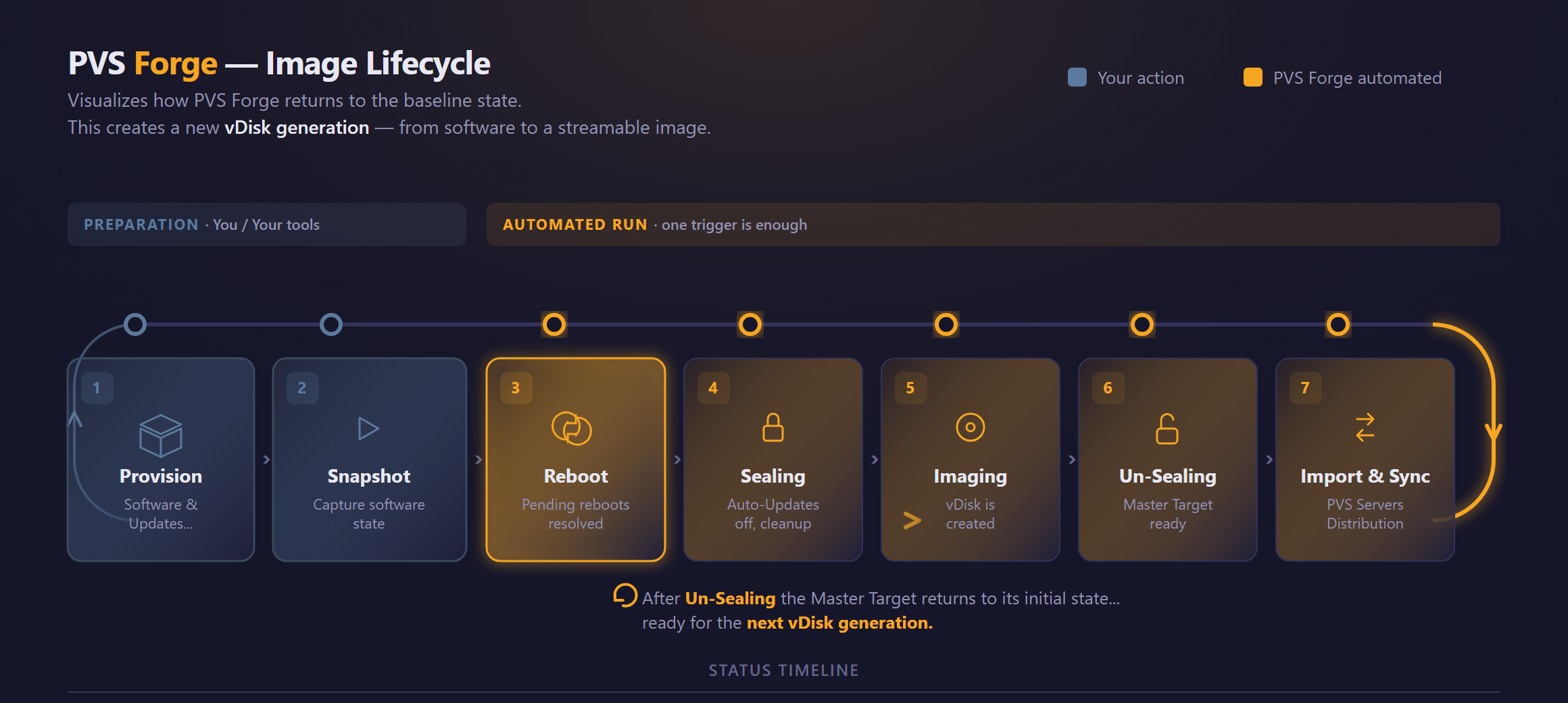
This is exactly where PVS Forge on. It's a Windows tool that rethinks the vDisk lifecycle for Citrix Provisioning Services: from master target preparation to imaging and distribution to multiple PVS servers. Built by someone who has been running Citrix Provisioning productively for years - and has rubbed up against the very pain points that every PVS admin knows.
Here's what's included in version 1.0.
Your own imager
PVS Forge uses a own imager and uses the same technology as Citrix. It only reads occupied clusters from the NTFS allocation map, shows real-time progress and can be canceled cleanly.
Smart Multi-vDisk Imaging.
You can intelligently schedule multiple vDisks for imaging in a single run—job queue, fire-and-forget. Instead of sitting at the wizard one after another and checking boxes, multiple vDisks can be created in parallel—and in a smart way. Optimal utilization and allocation of PVS servers enable the seamless creation of multiple vDisks at the same time.
Imaging without DHCP, TFTP, no boot drama
This is the point that makes the biggest difference - and which eats up the most hours in classic PVS imaging.
Anyone who works in segmented networks (the public sector, banks, any properly segmented enterprise environment) is familiar with this: For classic PVS imaging, the Master Target has to reboot—that is, perform a PXE boot via DHCP options and a TFTP server in the exact same VLAN where the MT is located. Is the VLAN without a DHCP helper? Tough luck. Is PXE prohibited in that segment? Tough luck. Does TFTP not work through the firewall? Tough luck.
PVS Forge does not need any of this:
- No PXE boot of the Master Target
- No DHCP options for stream mode
- No TFTP server in the imaging path
- No vDisk attachment to the current MT
- No reboot of the MT for the imaging process
The Imager operates directly on the running system. The Master Target remains online, in normal boot mode, within its own network context. There is no risk that the MT will fail to boot after a failed boot attempt—because it no longer needs to boot!
Anyone who has ever experienced a live imaging boot disaster—where the system won't boot, the BCD is corrupted, vDisk Lock is still active, and a Citrix support ticket has been opened—knows just how much effort this saves.
Session-Free Check: no imaging into chaos
Classic problem: You start the imaging, an admin logs in to the master target at the same time, changes something, looks it up, forgets to log out. The image now contains a state that nobody wanted. In the worst case: a profile drift that only becomes apparent days later when the productive targets have already been booted with it.
Before each imaging run, PVS Forge checks that no active session is running on the master target - neither RDP nor local console. If it finds one, it blocks the run and shows you which account has the session open. You decide whether to force it or clean it up first. But you don't start silently with a dirty image.
Multi-NIC targets without witchcraft
Anyone who has ever set up a master target with separate stream NIC and user LAN NIC knows the drama: The NetworkCategory jumps to „Public“, the FQDN resolution goes via the stream IP, WinRM blocks via the subnets - and suddenly nothing can be reached.
PVS Forge resolves NetBIOS names via the right NIC and makes address resolution deterministic. You get stable imaging workflow in real multi-NIC setups, without routing tricks or local hosts-entries.
Secure multi-server sync
If you have more than one PVS server, the next pain point is to bring the new vDisk to all servers. Classic: Manually started Robocopy script or even manual copying.
PVS Forge Copied locally to from the source PVS, which pushes directly to the admin shares of the remaining PVS servers via UNC. Selectable per vDisk generation, with checkbox UI.
vDisk-Inventory: History, comparison and AI analysis
A new vDisk generation is ready. What's on it? What has changed compared to the previous one? In classic setups: nobody knows for sure. You hope that the change log is correct, that no admin has installed an MSI on the side, that the auto-updates were really off.
PVS Forge captures per vDisk one Structured inventory - installed software, versions, drivers, services, registry anchor points. This gives you three views:
- Single vDisk history: the inventory of a single vDisk can be viewed over its generations - you can browse through what was on it at what time. Even without comparison, simply to understand the status of a generation.
- Inventory diff: what was added, changed, removed - between v6 and v7, for example
- Offline Inventory: You have probably already created vDisks before PVS Forge but no inventory. No problem, simply load the VHDX in comparison and the inventory will be created from the offline vDisk.
- AI Analysis of the vDisk: AI-based evaluation of the new vDisk. „This driver update deviates from your usual pattern.“ „This software version has known compatibility issues with your Citrix version.“ Senior architect logic, automated.
You no longer go into a vDisk rollout blindly. You know what's on it, what has changed - and whether it needs attention.
Custom Pre-Sealing Script Support
Every environment has its own peculiarities. For one customer, certain cleanup paths must be emptied before sealing. For another, an in-house provisioning agent must be reset. For a third, there is a compliance script that must always be running.
PVS Forge allows Custom Pre-Sealing ScriptsYou store your own PowerShell scripts, which are executed immediately before the final image sealing - with defined return values, logging in the central job history and clean error handling. What you do in the script is up to you. PVS Forge ensures that it runs at the right time.
This means that the tool is not rigid. If you have special cases, you can build them in cleanly.
Diagnostics instead of a tick list
Standard pre-checks are rigid: twelve check marks, „all green, continue“. This doesn't help if the twelfth condition never applies in your environment anyway - because your animal model looks different or a path doesn't exist in your area.
PVS Forge brings a Context-sensitive diagnosticsChecks connectivity, rights, ports and WinRM, but evaluates in the context of your setup. What is really a show stopper is marked as a show stopper. What is only a convention remains a hint. Support effort, cast in software.
What you get - and keep - when you buy
PVS Forge is sold in two tariffs, both with full range of functions:
- Standard (up to 2 PVS servers)
- Growth (from 3 PVS servers)
The model is an update subscription: twelve months of updates and manufacturer support. But - and this is the important part:
What you buy is yours. Forever.
If your update subscription expires, your last working build remains active. No SaaS cutoff, no license server that locks you out on the 366th day. A signed offline license, validated locally.
Digital sovereignty without an asterisk
PVS Forge is completely on-premises, air-gap-compatible, no cloud, no "phone-home," no dependence on an activation server. The manufacturer is Koetzing IT from Germany.
If you work in an industry where „we communicate with the manufacturer over the Internet“ is a no-go - public sector, financial services, healthcare, defense - PVS Forge works exactly the way you need it to: offline, verified, local.
Wondering where the journey is taking you? PVS Forge is already a fully-fledged tool - but that's just the beginning. Read the roadmap: from the health check to the VDI lifecycle platform.
[ Request a Trial Version ] · [ View the 2026–2029 Roadmap ] · [ Read the documentation ]
 German
  English