
System startup, login, streaming: What the PVS load balancing actually determines
Three Phases, Three Sets of Rules
UDP 6910 is the source of three common misconceptions: regarding port ranges, regarding capacity, and regarding what the PVS load balancing actually balances. The process consists of three phases, each with different rules:
- „Boat“ determines who the target queries.
- Registration It is done through a single handshake that determines everything.
- Streaming remains unchanged until the next reconnection.
Phase 1: Boat
The goal is derived from its Bootstrap, whom it needs to contact, and not from the PVS server. The bootstrap contains up to four entries, each of which has its own IP address and a own port (Bootserver1_Ip, Bootserver1_Port, …).
- PXE/TFTP: The target device retrieves the boot image every time the system starts up, so that changes take effect as early as the next startup.
- BDM: The configuration is stored on the boot medium. Changes made on the server are not transferred to the target device, so the medium must be recreated.
Phase 2: Login
- Registration takes place in a a single data exchange: a 28-byte request and a 28-byte response.
- The answer already contains the Streaming server, the port, and the vDisk.
- The selected server is not receiving any packets on the login port. No handoff occurs.
Load distribution is Set once during registration. Since PVS streaming uses UDP, the destination does not „switch“ ports. It simply forwards all incoming and outgoing traffic to the port specified in the response. A single „StreamProcess.exe“ instance monitors all ports in the range, with each port assigned to its own thread pool.
6910 is not the login port. The first port in the range is
6910 is simply the Default initial value of the range (Network → First Port / Last Port). With regard to this first port:
- 1. Port: Registration, in reception mode, no devices connected
- 2. Port: in reception mode, no devices connected
- 3. Port: not in receive mode
- 4. Port and higher: Streaming
For devices 6910–6930, the numbering starts at 6913, leaving 18 ports with 8 threads each—that is 144 slots where the PVS server can place the devices.
144 seats, but no one can guarantee who will sit where
Citrix estimates this configuration at 250 devices on 2 CPUs, or 1.74 devices per seat. This is a deliberate over-provisioning: 8 threads on 2 CPUs correspond to a ratio of 1:4, which Citrix states is supported. Since the devices are idle most of the time, the seats were never intended for users.
But 144 slots on 18 ports means 8 devices per port, and that math doesn't add up. This is an average value, not a classification..
The devices are not distributed evenly across the ports. The port is selected during login without taking into account how heavily the ports are currently loaded, and no adjustment is made afterward, since the assignment remains in effect until the next reconnection.
Here is a specific example: A PVS server with 207 devices, which, at 1.44 devices per slot, is well within the reference value:
- The port with the highest utilization: 18 devices, 2.25 per thread
- Minimum number of ports: 7 devices, 0.88 per thread
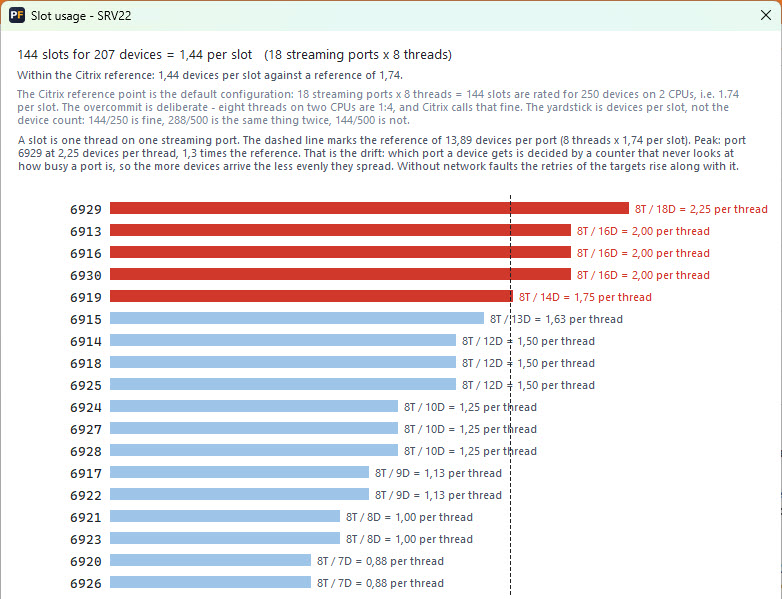
The busiest port is greater than the Citrix benchmark, while the server as a whole is below it. The average value indicates that the server is functioning properly. The port responsible for handling requests tells a different story, and it could be that this particular port is more likely to result in retries.
The size of this range depends on the specific business. The key factor is, that they exist at all and that no capacity specification can make this clear to you.
Phase 3: Streaming
All I/O passes through a single port on a server and is handled exclusively by that port's thread pool (8 by default). If the pool is at full capacity, requests are placed in a queue. Adjacent ports do not provide a solution, and retry requests are forwarded to the same port.
- „Ports × Threads“ is a limit on concurrency per port, not a limit on connections.
- A connected device never changes the server or the port. A new server remains empty, and an overloaded server is not relieved.
- Each time a new connection is established, a new server and port are assigned.
The exception: Rebalance
Before   DEV-1 -> PVS-A: 6923 DEV-2 -> PVS-A: 6922
Invoke-PvsRebalanceDevices -ServerName PVS-A
After    DEV-1 -> PVS-A : 6921 DEV-2 -> PVS-B : 6920
DEV-2 was moved to a different server without a reboot. DEV-1 remained on the same server but was assigned a new port. The number of subsequent retry attempts was negligible. Since this example involved devices in idle mode, it is not possible to determine how load balancing would behave under load.
Three settings, one default setting
Once you know this variation exists, you can take steps to address it. Ports, threads per port, and CPUs can all be found in the server properties, and all three affect the same metric:
- By adding more ports The devices are distributed across multiple queues.
- A higher number of threads For each port, it shortens the queue that is currently becoming overloaded.
- More CPUs offer both.
The 1:4 ratio underlying the 8 threads on 2 CPUs is a standard value, not an upper limit. A server with far more cores can handle significantly more threads per port while still remaining well within this ratio. However, most people do not do this, since the value was set once and there was never a reason to reconsider it.
Tools Used
- PVS RAM Health Check
- PVS Forge Health Advisor
 German
  English